
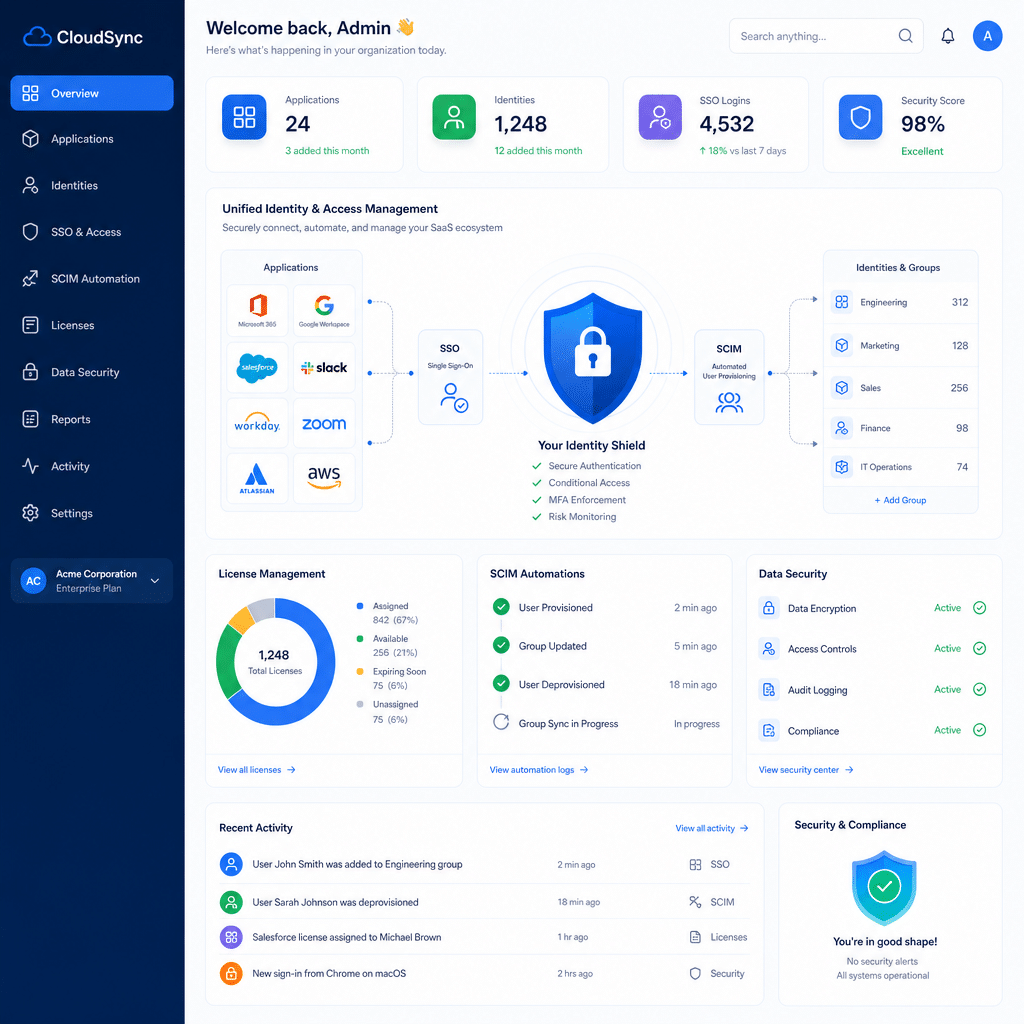
SaaS makes it easy for teams to move quickly, but that convenience can create a difficult operational problem: SaaS sprawl. As employees adopt applications for collaboration, productivity, marketing, finance, and specialized work, organizations can lose track of who has access, which licenses are active, and whether each tool still meets security requirements.
Controlling SaaS sprawl requires more than deleting unused accounts. It requires a coordinated approach that combines single sign-on (SSO), System for Cross-domain Identity Management (SCIM), and disciplined license hygiene. Together, these practices help organizations improve visibility, automate access, reduce waste, and lower security risk.
Table of Contents
- What Is SaaS Sprawl?
- Why SaaS Sprawl Matters
- The Role of SSO in SaaS Control
- How SCIM Automates User Lifecycle Management
- Building a License Hygiene Program
- A Practical Implementation Strategy
- How to Measure Success
- Conclusion
- Frequently Asked Questions
What Is SaaS Sprawl?
SaaS sprawl is the uncontrolled growth of cloud-based applications across an organization. It often begins with a legitimate business need: a team signs up for a free trial, a department purchases a niche platform, or an employee uses a personal credit card to solve an urgent problem.
Over time, these decisions can create a fragmented application environment. Multiple teams may purchase similar tools, former employees may retain active accounts, and IT or security teams may not know where sensitive business data is stored.
SaaS sprawl is not simply a technology inventory issue. It affects identity management, compliance, procurement, budgeting, data protection, and employee productivity. Effective control therefore requires cooperation among IT, security, finance, procurement, and business leaders.
Why SaaS Sprawl Matters
Unmanaged applications introduce risks that become more significant as an organization grows. The most common problems include:
- Security exposure: Unapproved applications may lack strong authentication, encryption, monitoring, or appropriate security controls.
- Orphaned accounts: Users who leave the organization may retain access when deprovisioning is manual or inconsistent.
- Unnecessary spending: Companies may pay for duplicate tools, inactive users, unused seats, or automatic renewals.
- Compliance challenges: Auditors may require evidence of access reviews, user deprovisioning, and application oversight.
- Operational complexity: Employees waste time choosing between overlapping platforms or requesting access through inconsistent processes.
The goal is not to eliminate every application outside the IT department. The goal is to create enough visibility and control to make informed decisions without slowing down the business.
The Role of SSO in SaaS Control
Single sign-on allows users to access multiple applications through a central identity provider. Instead of managing a separate password for every service, employees authenticate through a controlled sign-in experience, often using the organization’s existing credentials and security policies.
How SSO reduces risk
SSO creates a central point for authentication and access policy enforcement. Organizations can apply multifactor authentication, conditional access, device requirements, and other controls consistently across connected applications.
When an employee leaves, disabling the user in the central identity provider can immediately prevent access to many integrated services. This is more reliable than asking administrators to manually disable accounts in dozens of separate applications.
How SSO improves visibility
Applications connected to an identity provider become easier to discover and manage. Administrators can review assigned users, authentication activity, and application usage from a more centralized perspective.
SSO does not automatically solve all SaaS sprawl. An application that is not integrated with the identity provider may remain outside the organization’s visibility. For that reason, SSO should be part of a broader application discovery and governance process.
SSO implementation considerations
- Prioritize applications that contain sensitive data or support critical business processes.
- Use a consistent naming and ownership convention for connected applications.
- Require application owners to review access regularly.
- Track applications that cannot support SSO and document compensating controls.
- Combine SSO with multifactor authentication and risk-based access policies.
How SCIM Automates User Lifecycle Management
SSO manages authentication, but it does not always create or remove user accounts inside an application. SCIM addresses this gap by automating identity provisioning and deprovisioning between a central directory and supported SaaS applications.
When a user joins the organization, SCIM can create accounts and assign appropriate roles. When the user changes departments, SCIM can update group membership or access attributes. When the user leaves, SCIM can suspend or remove access based on the organization’s lifecycle rules.
Why SCIM matters for offboarding
Manual offboarding is slow and prone to error, particularly when an employee has access to many applications. A missed account can expose company data, create licensing costs, or violate internal policies.
SCIM shortens the time between an identity change and the corresponding application change. It also creates a more repeatable process that is easier to audit and maintain.
SCIM limitations to plan for
Not every SaaS provider supports SCIM, and implementations can differ. Some applications support only basic provisioning, while others may have limitations around groups, roles, suspended users, or license assignment.
Before enabling SCIM, confirm how the application handles account matching, username changes, group synchronization, and deprovisioning. Test the workflow with a small group first, and define what happens if synchronization fails.
Building a License Hygiene Program
License hygiene is the ongoing practice of ensuring that software licenses are accurate, necessary, properly assigned, and aligned with actual usage. It connects identity data, application activity, contract information, and financial ownership.
Start with a complete application inventory
Build a central inventory of known and discovered applications. Include the application name, business owner, technical owner, vendor, contract dates, renewal terms, data classification, authentication method, number of purchased seats, and number of active users.
Discovery should combine multiple sources. Identity provider reports, expense records, procurement systems, browser or endpoint data, finance statements, and employee surveys can each reveal applications that another source misses.
Define meaningful usage criteria
An inactive user is not always an unnecessary user. Some applications are used monthly, quarterly, or only during specific business cycles. Establish usage thresholds that reflect the purpose of each tool rather than applying one universal rule.
Useful indicators may include recent login date, feature activity, assigned role, department, last content creation, and whether the user is still employed. Review these indicators together before reclaiming a license.
Manage renewals proactively
Renewal dates often expose the cost of poor license management. Begin a review well before the cancellation deadline so stakeholders have time to validate usage, negotiate terms, remove inactive seats, and assess alternatives.
A renewal review should answer several questions:
- How many licenses are purchased, assigned, and actively used?
- Are there overlapping applications that serve the same purpose?
- Does the current plan include features users do not need?
- Has the application owner approved the renewal?
- Has the vendor’s security and compliance posture changed?
A Practical Implementation Strategy
Organizations can control SaaS sprawl without attempting a disruptive cleanup of every application at once. A phased program is easier to manage and provides measurable progress.
- Establish ownership. Assign executive sponsorship and create a working group that includes IT, security, finance, procurement, legal, and business representatives.
- Discover the environment. Consolidate data from identity systems, expense reports, procurement records, and application directories to create an initial inventory.
- Classify applications. Group tools by risk, data sensitivity, business criticality, cost, and integration status.
- Standardize authentication. Require SSO for high-value or sensitive applications whenever the vendor supports it.
- Automate lifecycle events. Deploy SCIM for priority applications and connect access changes to joiner, mover, and leaver workflows.
- Clean licenses. Reclaim unused seats, remove duplicate tools, and establish renewal review deadlines.
- Set intake rules. Create a lightweight process for employees to request new applications, including security, privacy, integration, and cost checks.
- Review continuously. Schedule recurring access reviews, application owner attestations, and license utilization checks.
Make governance usable
Overly restrictive policies often encourage employees to work around IT. A better approach is to provide an approved application catalog, clear request timelines, and practical alternatives when a requested tool is not allowed.
Governance should also account for legitimate exceptions. A research team or engineering group may need a specialized application that cannot meet every standard requirement. Document the exception, assign an owner, and set a review date rather than allowing unmanaged permanent access.
How to Measure Success
Metrics help demonstrate whether SaaS management is reducing risk and improving efficiency. Track a balanced set of operational, security, and financial indicators, such as:
- Percentage of applications integrated with SSO.
- Percentage of eligible applications using SCIM.
- Time required to disable access after a termination event.
- Number of orphaned or inactive accounts discovered.
- Unused or reclaimed licenses.
- Duplicate applications removed or consolidated.
- Annual savings from license optimization.
- Percentage of applications with assigned business and technical owners.
- Completion rate for periodic access reviews.
Do not focus only on cost savings. Faster offboarding, better audit evidence, fewer unsupported applications, and improved employee experience are also important outcomes.
Conclusion
SaaS sprawl grows when applications, identities, and licenses are managed separately. SSO provides centralized authentication and better visibility, SCIM automates user lifecycle changes, and license hygiene ensures that spending and access remain aligned with actual business needs.
The most effective program is continuous rather than one-time. Start with an accurate inventory, prioritize high-risk applications, automate repeatable tasks, and give every important application a clear owner. With the right combination of technology and governance, organizations can support innovation while keeping SaaS secure, efficient, and manageable.
Frequently Asked Questions
Is SSO enough to control SaaS sprawl?
No. SSO improves authentication and visibility, but it does not identify every application or automatically remove unused licenses. It works best alongside application discovery, SCIM, access reviews, and license management.
What is the difference between SSO and SCIM?
SSO controls how users authenticate to an application. SCIM automates account provisioning, updates, and deprovisioning. In simple terms, SSO manages sign-in, while SCIM manages the user account lifecycle.
How often should organizations review SaaS licenses?
Review usage continuously where possible, conduct formal access and license reviews at least quarterly, and begin a detailed analysis well before each renewal deadline.
Can small businesses benefit from SaaS sprawl controls?
Yes. Smaller organizations may have fewer applications, but they can still face security exposure and wasted spending. Starting with SSO, an application inventory, and a documented offboarding process creates a strong foundation for growth.
Leave a Reply