
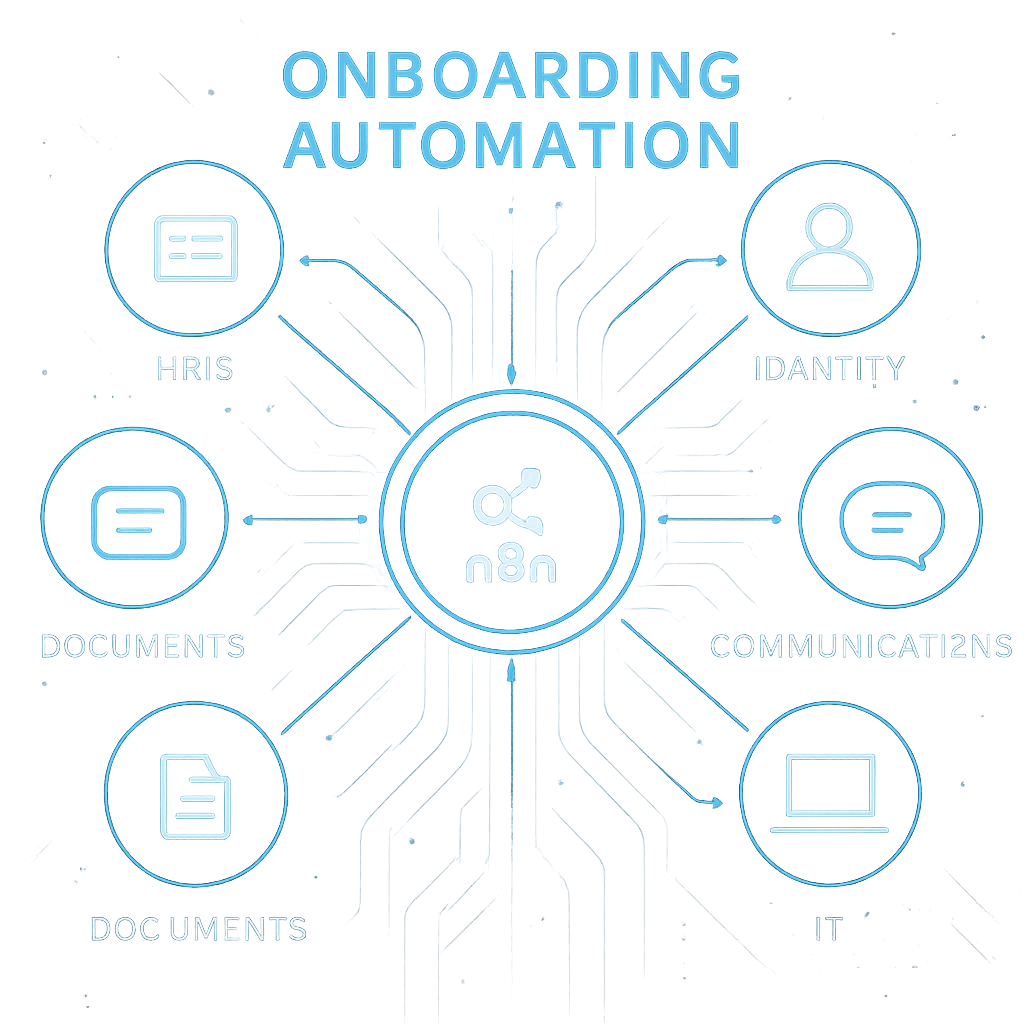
New employee onboarding can feel like a relay race with too many handoffs and not enough batons. Forms need signatures, accounts must be provisioned, managers expect a smooth first day, and new hires deserve clarity and momentum. With n8n, you can orchestrate these moving parts into a reliable, auditable workflow that runs the same way every time—without writing a mountain of custom code.
This playbook walks you through a practical, step-by-step approach to automate onboarding using n8n. Whether you’re an HR generalist, an IT admin, or an ops-minded manager, you’ll learn how to design, build, and scale an automation that reduces time-to-productivity, eliminates busywork, and delights your new hires.
Table of Contents
- Why Automate Onboarding
- Prerequisites and Tools
- Architecture Overview
- Step-by-Step Playbook
- Building the n8n Workflow
- Error Handling and Retries
- Security and Compliance
- Testing and Rollout
- Metrics and Optimization
- Templates and Reusability
- Common Pitfalls
- Conclusion
- Frequently Asked Questions
Why Automate Onboarding
Onboarding is the moment where first impressions become lasting ones. Manual processes are slow, error-prone, and difficult to audit. Automation with n8n centralizes the logic, adds guardrails, and ensures every new hire gets a consistently excellent experience.
Key outcomes you can expect:
- Faster time-to-productivity: Accounts, access, and equipment are ready on day one.
- Fewer errors: Data validation and standardized templates reduce mistakes.
- Better visibility: Logs, alerts, and dashboards show progress at a glance.
- Happier teams: HR and IT spend less time chasing tasks and more time supporting people.
Prerequisites and Tools
Before you start, assemble the building blocks. You don’t need everything listed here, but each tool addresses a common onboarding need.
- HRIS or source of truth: BambooHR, Personio, HiBob, Workday, or a Google Sheet/Airtable.
- Identity and email: Google Workspace or Microsoft 365; optionally SCIM/SSO via Okta/Azure AD.
- Collaboration: Slack or Microsoft Teams.
- Project/task systems: Asana, Jira, Trello, ClickUp.
- Docs and e-signature: Google Docs/Drive, DocuSign, Dropbox Sign, Adobe Acrobat Sign.
- Asset management and ticketing: Jira Service Management, ServiceNow, or Freshservice.
- n8n: Cloud or self-hosted with access to credentials for the above.
Recommended setup for n8n:
- Separate dev and prod environments or at least separate workflows/credentials.
- Environment variables for secrets and regional settings (time zones, locales).
- Version control via n8n’s built-in versions and exported JSON in a git repo.
Architecture Overview
Your onboarding automation is a hub-and-spoke model. n8n is the hub that receives a “new hire” event and fans out to provision accounts, create tasks, send messages, and track status. Data flows in from an HRIS, form, or spreadsheet; workflows enrich and validate the payload; downstream systems are called in the right order with appropriate conditions.
A typical flow:
- Trigger: New employee record is added (via Webhook, HRIS app trigger, or Schedule + polling).
- Normalize: Map fields, validate required data, and resolve manager/department references.
- Provision: Create email and identity, add to groups, set licenses and permissions.
- Communicate: Send welcome messages, manager checklists, and calendar invites.
- Compliance: Generate documents, route e-signature, store PDFs, update audit log.
- Tasks: Open IT tickets, track equipment, and assign role-specific learning modules.

Step-by-Step Playbook
1) Define outcomes and SLAs
Clarify what “great onboarding” means for your organization. Set SLAs for account creation, hardware readiness, and day-one meeting invites. Agree on success metrics such as time-to-productivity (TTP) and completion rates for required tasks.
2) Map the process and data
List every step from offer acceptance to week-one check-ins. Identify data owners and sources. Define a canonical “New Hire” schema with fields like name, email, start date, role, department, location, manager, employment type, and equipment needs.
3) Prepare credentials and sandboxes
Collect API keys, OAuth apps, and test accounts for each system. Create a safe test tenant or a restricted group to validate provisioning without hitting real users.
4) Establish the source of truth
Choose one system to trigger the workflow. Many teams start with BambooHR, a Google Sheet, or Airtable. Ensure there’s a unique employee ID; if none exists, generate one and store it consistently.
5) Orchestrate identity and account provisioning
Decide how accounts are created. For Google Workspace or Microsoft 365, define naming conventions and group memberships by department and location. If you use Okta/Azure AD, plan SCIM group assignments for downstream apps.
6) Automate communications
Draft templates for the new hire, manager, IT, and buddy. Include timelines, expectations, and links. Automate Slack or Teams messages, and ensure the manager receives a checklist ahead of the start date.
7) Documents and compliance
Generate NDAs, policies, and tax forms from templates. Send them for e-signature and store completed PDFs in a secure folder with proper naming. Update a compliance tracker with timestamps.
8) Hardware and access
Open tickets for laptop configuration, shipping, badge access, and software licenses. Tie the ticket IDs to the new hire record and set due dates based on the start date.
9) Day-one experience
Schedule a welcome call, IT setup session, and team lunch. Send a “First Week at a Glance” calendar invite bundle. Provide a short, friendly welcome message from leadership.
10) Feedback loop
Collect quick pulse checks on day 3 and day 14, plus a manager survey on week 2. Use the insights to refine templates, fix bottlenecks, and tune SLAs.
Building the n8n Workflow
Triggers: start the flow
- Webhook: Use when your HRIS or form can POST a payload to n8n.
- App Triggers: BambooHR, Airtable, Google Sheets, or Notion triggers when a row/page is added.
- Schedule + HTTP: Poll an API for new records if webhooks aren’t available.
Normalize and validate data
- Set node to map incoming fields to your canonical schema.
- IF and Switch nodes to branch by location, department, or employment type.
- Function node for light transformations (e.g., username slug, email format, start date offsets).
- Lookup managers or cost centers via Airtable/Sheets/HRIS API to avoid typos and mismatches.
Provision identity and accounts
- Google Workspace/Microsoft 365: Create user, set org unit, add groups, and apply licenses.
- SCIM via HTTP Request: For Slack, GitHub, Notion, and other apps supporting SCIM, create user and assign groups.
- Role-based bundles: Maintain a matrix (e.g., in Airtable) mapping department/level to groups and licenses, then loop through it in n8n.
Communications and calendars
- Slack/Microsoft Teams nodes to DM the new hire, welcome them in a channel, and notify the manager.
- Gmail/Outlook node to send a welcome email with links to the handbook and first-day schedule.
- Google Calendar/Microsoft Calendar nodes to create a “First Week” event set with correct time zones.
Tasks and checklists
- Asana/Jira/Trello: Create tasks for IT (laptop), Facilities (badge), and Manager (30-60-90 plan).
- Attach metadata (employee ID, start date, manager) so tickets are easy to search and report on.
Documents and e-signature
- Google Docs node to fill a template (NDA, policy acknowledgments) with new hire data.
- Drive node to store generated PDFs in a secure, structured folder.
- DocuSign/Dropbox Sign via HTTP Request nodes to send, wait, and retrieve completed documents.
Waiting, approvals, and sequencing
- Use Wait or Wait for Webhook to pause until a signature or ticket completes.
- Gate sensitive steps (e.g., admin permissions) behind an approval: post an actionable link to a small approval workflow.
- Sequence provisioning so identity is created first, followed by app access, then communications.
Logging and audit trail
- Write key events (created user, added group, sent contract) to a log table in Airtable/Sheets/DB.
- Store API response IDs for traceability and easier support.
- Tag runs with an external correlation ID (employee ID) for easy search.
Error Handling and Retries
Errors are inevitable. Plan for them so your workflow is resilient and transparent.
- Continue On Fail on non-critical steps; branch failed items to a recovery path.
- Retry policy: Implement exponential backoff for transient errors (HTTP 429/5xx).
- Idempotency: Use unique external IDs so re-runs don’t create duplicate users or tasks.
- Alerts: Send Slack/Email alerts with a summary and deep link to the run data.
- Error Trigger workflow to centralize notifications and escalations.
Security and Compliance
Onboarding touches sensitive personal data. Treat it with care and align to your compliance needs.
- Store credentials in n8n’s built-in encrypted credentials, not in nodes.
- Restrict PII to only what’s required; mask or omit data in logs and notifications.
- Apply least-privilege scopes to API keys and service accounts.
- Encrypt documents at rest and control access via groups/folders.
- Maintain an audit log (who, what, when) for security and regulatory reviews.
Testing and Rollout
A thoughtful rollout keeps your team confident and your new hires unaffected by teething issues.
- Dev first: Use test users, fake emails, and a staging Slack/Teams workspace.
- Dry-run mode: Add a global toggle to skip writes and only log would-be actions.
- Pilot: Start with one department or location to validate edge cases.
- Gradual enablement: Turn on provisioning steps in phases, starting with least risky.
- Rollback plan: Document manual fallback steps if something fails mid-run.
Metrics and Optimization
Measure what matters so you can continuously improve.
- Time-to-productivity: Hours from account creation to first completed tasks.
- Lead time: Time from HRIS record creation to day-one readiness.
- Failure rate: Percentage of runs with manual intervention.
- SLA adherence: On-time completion of provisioning, documents, and equipment.
- Satisfaction: New hire and manager survey scores at 2 and 6 weeks.
Feed metrics into a dashboard (Sheets, Looker Studio, or BI) and create alerts for SLA breaches. Use insights to refine templates, adjust sequencing, and improve error handling.
Templates and Reusability
Design for reuse so you can scale as your organization grows.
- Sub-workflows for repeatable tasks (e.g., “Create Google User,” “Send Welcome Pack”).
- Config tables for role-based access bundles and messaging templates.
- Environment variables for tenant IDs, base URLs, and time zones.
- Versioned templates for documents so historical runs are reproducible.
Common Pitfalls
- Inconsistent data: Unvalidated fields lead to provisioning failures—normalize early.
- No idempotency: Without unique IDs, retries create duplicates.
- Over-automation: Keep humans in the loop for sensitive approvals.
- Ignoring time zones: Calendar invites at the wrong time damage first impressions.
- Poor documentation: Document runbooks, ownership, and recovery steps.
Conclusion
Automating onboarding with n8n turns a complex, cross-functional process into a dependable, trackable system. By defining outcomes, mapping data, building modular workflows, and measuring results, you’ll reduce delays, eliminate errors, and create a first day that truly welcomes new colleagues.
Start small: pick one trigger, one identity system, and one communications channel. Prove the value, then expand to documents, equipment, and learning plans. The result is a scalable onboarding engine that grows with your team.
Frequently Asked Questions
Do I need to write code to use n8n for onboarding?
No. Most steps can be configured with native nodes and simple expressions. For advanced logic, the Function node enables light JavaScript, but it’s optional.
What if my HRIS doesn’t support webhooks?
Use a scheduled workflow to poll for new records via the HRIS API, or sync HR data into a Google Sheet/Airtable and trigger on new rows.
Can I handle approvals in the workflow?
Yes. Create an approval sub-workflow using a Webhook and Wait pattern. Notify the approver in Slack/Email with a link; proceed based on their response.
How do I avoid duplicate accounts?
Use idempotent keys (employee ID or email) and check for existing users before creation. Store external IDs for each app so retries update rather than duplicate.
Leave a Reply