
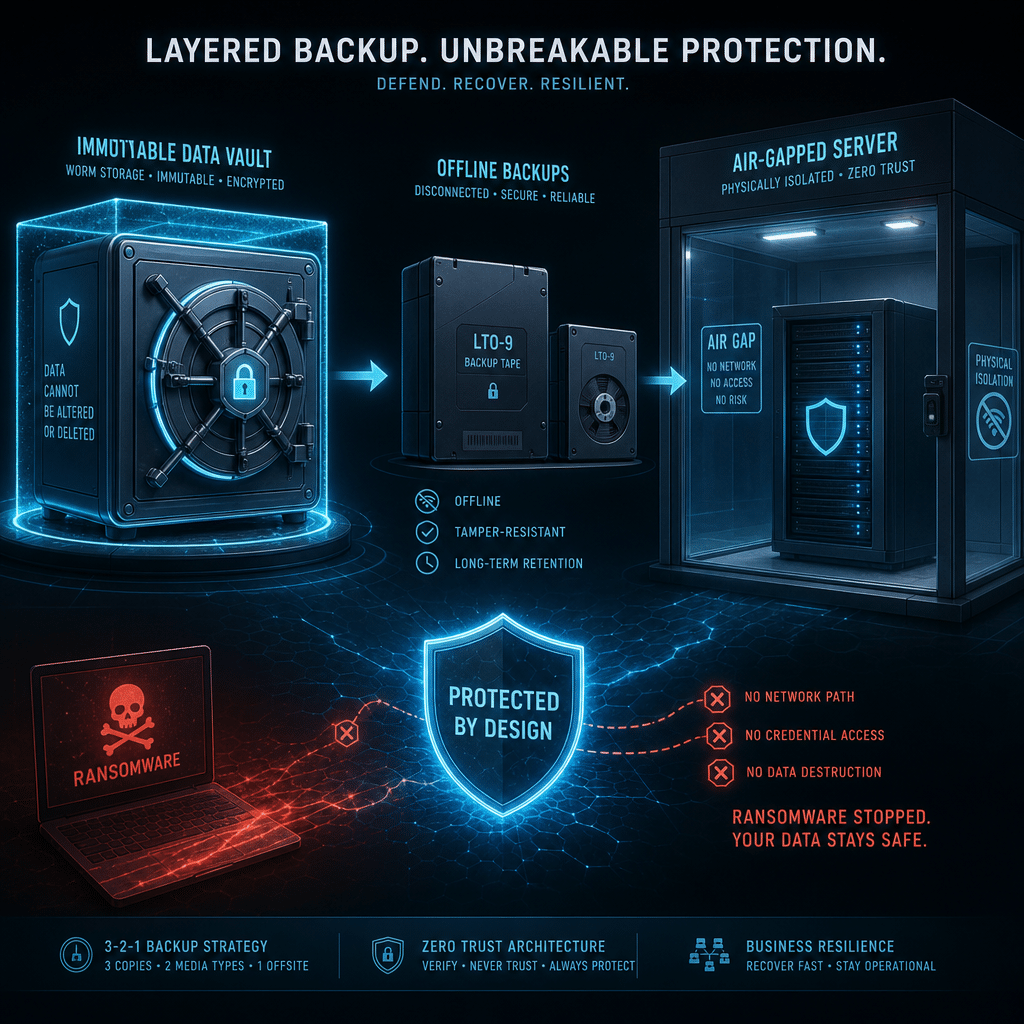
Backup failures rarely happen because an organization has no backup at all. More often, they happen because every copy is connected to the same network, managed through the same credentials, or vulnerable to the same destructive event. When ransomware reaches production systems, a connected backup can be encrypted along with everything else.
Air-gapped, offline, and immutable backups are three important ways to isolate recovery data. Although the terms are sometimes used interchangeably, they describe different protection mechanisms. This guide explains how each technique works, where it is strongest, what trade-offs it introduces, and how organizations can combine them into a resilient backup strategy.
Table of Contents
- Why Backup Isolation Matters
- What Are Air-Gapped Backups?
- What Are Offline Backups?
- What Are Immutable Backups?
- Comparing the Three Techniques
- Choosing the Right Backup Isolation Strategy
- Implementation Best Practices
- Conclusion
- Frequently Asked Questions
Why Backup Isolation Matters
A backup is useful only if it can be recovered when the original data is unavailable, corrupted, or compromised. Traditional backup systems often remain continuously connected to production networks so that they can run frequent jobs and support quick restores. That convenience can also create a major weakness.
An attacker who gains administrative access may be able to discover backup servers, delete recovery points, alter retention settings, or encrypt backup repositories. Natural disasters, hardware failures, insider threats, and accidental deletion can cause similar damage when backup infrastructure shares the same physical location or access controls as production systems.
Backup isolation reduces the chance that one incident will affect every copy. It supports the widely used 3-2-1 backup principle: maintain at least three copies of data, use two different types of media, and keep one copy in a separate location. For high-value or regulated data, organizations often go further by adding an isolated or immutable copy.
What Are Air-Gapped Backups?
An air-gapped backup is separated from production systems by a physical or logical gap. In the strictest sense, the backup environment has no network connection to the systems it protects. Data can be transferred only through a controlled process, such as removable media, a secured transfer station, or a carefully managed replication window.
Strengths of air-gapped protection
- Strong resistance to remote attacks: A system that is not connected cannot be reached directly through a network intrusion.
- Protection from credential-based attacks: Attackers cannot simply use compromised domain or cloud credentials to access a truly disconnected repository.
- Separation from production incidents: An air-gapped copy can remain safe during ransomware outbreaks, network compromise, or widespread system misconfiguration.
- Clear operational boundaries: Access can require physical presence, approvals, and documented procedures.
Limitations and operational challenges
Air-gapping can make backup and recovery slower. Data transfers may require manual handling, specialized equipment, or scheduled procedures. If the process is poorly documented, staff may fail to create backups consistently or may struggle to restore data during an emergency.
Air-gapped systems also require careful validation. Removable media can be lost, damaged, infected before it is disconnected, or become unreadable over time. Organizations should use malware scanning, media inventories, encryption, access controls, and regular recovery tests to reduce these risks.
What Are Offline Backups?
An offline backup is not currently accessible through a network or live system connection. It may be stored on removable hard drives, tape cartridges, optical media, or another medium that is disconnected after the backup job is complete. Offline protection is therefore based on the backup being unavailable to attackers during normal operations.
Offline backups can be considered a practical form of air-gapping, but the terms are not always identical. Air-gapping emphasizes isolation by design, while offline describes the current connection state. A removable disk that is disconnected most of the time may provide offline protection, but it may not be a fully controlled air-gapped architecture if it is regularly connected to an untrusted computer.
Benefits of offline backups
- Reduced attack surface: Disconnected media cannot be encrypted or deleted through an active network session.
- Flexible deployment: Offline copies can be created with relatively simple hardware and procedures.
- Useful long-term retention: Tape and other removable media can support archival requirements at a lower cost.
- Clear recovery points: Each disconnected backup represents a defined snapshot that can be preserved from later changes.
Risks to manage
The main risk is human handling. If an organization leaves backup media connected for convenience, it is no longer providing meaningful offline isolation. Media may also be overwritten, mislabeled, stored in the same building as production equipment, or unavailable when a recovery is urgently needed.
To make offline backups dependable, define who can connect and disconnect media, document chain-of-custody procedures, store copies in a secure alternate location, and perform periodic restoration tests. Offline does not mean automatically encrypted, geographically separated, or protected from physical damage, so those controls must be addressed separately.
What Are Immutable Backups?
An immutable backup cannot be changed or deleted during a defined retention period. The data may remain online and accessible to backup software, but users and administrators cannot alter the protected recovery point until its immutability lock expires. This protection is commonly implemented through object storage retention policies, write-once-read-many technology, or backup platforms with tamper-resistant repositories.
Why immutability is valuable
- Protection against deletion: An attacker with access to production systems may be unable to remove locked recovery points.
- Defense against encryption: Existing restore points remain readable even if newer backups or production data are encrypted.
- Faster recovery access: Immutable repositories are often online or nearline, allowing faster restores than manually retrieved media.
- Policy-based enforcement: Retention can be automated and audited rather than relying entirely on staff behavior.
Immutability is not isolation
Immutability and connectivity solve different problems. An immutable repository that is exposed through a compromised management account may still be subject to configuration changes, service disruption, credential theft, or denial-of-service attacks. The stored objects may remain undeletable, but the organization could temporarily lose access to them.
For this reason, immutable backups should use separate administrative identities, multi-factor authentication, least-privilege permissions, independent monitoring, and protected management interfaces. A second copy in an offline or air-gapped location can provide additional resilience if the online repository becomes unavailable.
Comparing the Three Techniques
Each technique protects against a different part of the threat landscape. Air-gapped backups provide the strongest network separation. Offline backups offer a practical and often cost-effective form of disconnection. Immutable backups provide strong protection against modification and deletion while preserving convenient access.
- Best for network isolation: Air-gapped backups. They are designed to remain unreachable except through controlled processes.
- Best for simple physical separation: Offline backups. Disconnected media can be stored away from production and reconnected only when necessary.
- Best for fast recovery with tamper resistance: Immutable backups. Recovery points can remain available without being freely changeable.
- Best overall resilience: A combination of all three, supported by geographic separation and tested recovery procedures.
There is no universal winner. A small organization with limited staff may favor encrypted offline media and a cloud repository with immutability. A large enterprise may use immutable snapshots for rapid recovery, an isolated secondary environment for operational continuity, and tape or removable media for long-term disaster recovery.
Choosing the Right Backup Isolation Strategy
Start by identifying which data must be recovered first and how quickly it must be available. Recovery time objectives define the maximum acceptable downtime, while recovery point objectives define how much recent data the organization can afford to lose. These requirements should guide the balance between online convenience and offline protection.
Consider threat scenarios
Map each backup control to realistic incidents. Ransomware may require immutable and isolated copies. A fire or flood may require an off-site location. A stolen administrator credential may require separate accounts and strong authentication. A malicious insider may require independent approval and audit processes.
Consider scale and resources
Evaluate storage capacity, bandwidth, staffing, media costs, cloud fees, and the complexity of recovery. An advanced architecture is not effective if no one can operate it consistently. Choose procedures that can be followed during normal operations and under emergency pressure.
Use layered protection
A resilient design might keep one rapidly accessible immutable copy for routine recovery, one separate copy in another location, and one offline or air-gapped copy for worst-case scenarios. The exact arrangement depends on the organization, but the goal is to avoid a single point of failure in storage, credentials, location, or management software.
Implementation Best Practices
- Separate backup administration. Use dedicated accounts that are not shared with everyday production administration. Apply least privilege and require multi-factor authentication.
- Protect the management plane. Restrict access to backup consoles, storage controls, and retention settings. Monitor administrative actions and alert on unexpected policy changes.
- Encrypt data at rest and in transit. Store encryption keys separately from the backup environment, and establish a documented key-recovery process.
- Define retention policies. Keep enough recovery points to cover the expected time between compromise and detection. Avoid allowing automated cleanup to remove every usable copy.
- Maintain geographic separation. A backup in the same building may not help after a physical disaster. Select a location with appropriate security, connectivity, and environmental controls.
- Test restoration regularly. Verify that files, applications, databases, and entire systems can be recovered. Record recovery times and address failures instead of treating the existence of a backup as proof of readiness.
- Scan before and after transfer. Use malware detection and integrity checks when moving data to removable or isolated media. Preserve clean recovery points and document their status.
- Document emergency procedures. Include contact details, approval steps, media locations, credentials or key access, restoration priorities, and alternative communication methods if primary systems are unavailable.
Testing is especially important for air-gapped and offline strategies because a process that works in theory may fail when hardware is obsolete, media is degraded, or the responsible employee is unavailable. Practice should include a scenario in which production credentials and management tools cannot be trusted.
Conclusion
Air-gapped, offline, and immutable backups are complementary rather than competing technologies. Air-gapping creates strong separation, offline storage removes routine network exposure, and immutability prevents protected recovery points from being changed or deleted during a retention period.
The strongest backup strategy combines these controls with encryption, separate administration, geographic diversity, and regular recovery testing. Begin with the organization’s recovery requirements and threat model, then build layered protection that remains practical to operate. A backup is not truly resilient until it can survive an attack and be restored with confidence.
Frequently Asked Questions
Are air-gapped and offline backups the same?
Not exactly. An offline backup is disconnected from a network at a given time, while an air-gapped design emphasizes deliberate and robust separation from production systems. Offline media can be part of an air-gapped strategy, but its handling and transfer process determine how strong the isolation really is.
Can an immutable backup still be attacked?
Yes. Immutability can prevent data from being modified or deleted, but attackers may still target credentials, management systems, availability, or the infrastructure hosting the repository. Separate administration, multi-factor authentication, monitoring, and an additional isolated copy improve protection.
Which backup method is best for ransomware?
No single method is sufficient in every situation. Immutable backups can preserve recent restore points, while offline or air-gapped copies provide stronger separation if an attacker compromises the backup environment. Using both creates better defense in depth.
How often should isolated backups be tested?
Test restores on a schedule based on business risk, with critical systems tested more frequently. Include both individual file recovery and full application or system recovery, and document whether the results meet recovery time and recovery point objectives.
Leave a Reply