
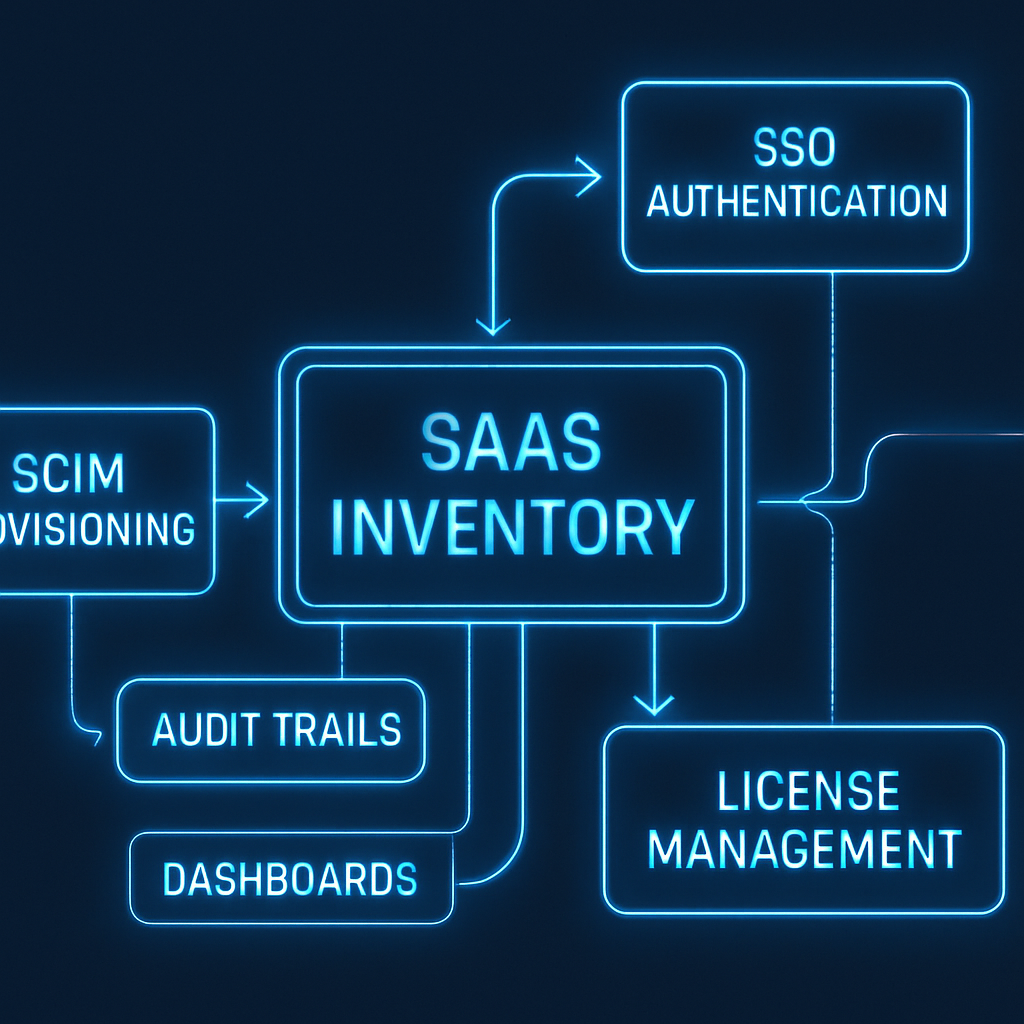
Your SaaS stack grows faster than you can spreadsheet it. New apps appear via trials, teams swap tools, and seats pile up. Then audit season hits—and suddenly you need to prove who has access to what, when they got it, why they need it, and how you remove it. The path out of this chaos starts with a disciplined inventory built on SCIM, SSO, and license management.
This guide explains how to design an audit-ready SaaS inventory that is accurate, automated, and defensible. You will learn the core concepts, a practical implementation roadmap, the controls auditors expect, and the reports leaders want.

Table of Contents
- What Does Audit-Ready SaaS Inventory Mean?
- Core Concepts: SCIM, SSO, and License Management
- Designing a Single Source of Truth
- Implementing SCIM for Lifecycle Automation
- Strengthening Access with SSO
- License Optimization and Cost Controls
- Controls, Evidence, and Audit Trails
- Dashboards, KPIs, and Reports
- Implementation Roadmap and Checklist
- Common Pitfalls and How to Avoid Them
- Conclusion and Next Steps
- Frequently Asked Questions
What Does Audit-Ready SaaS Inventory Mean?
An audit-ready SaaS inventory is a living catalog of all cloud apps, users, roles, and licenses—kept accurate through automation and governed by controls. It lets you answer, with evidence, the classic audit questions: who, what, when, why, and how.
Why it matters
- Risk reduction: Eliminates orphaned accounts and overprivileged access.
- Cost control: Reclaims unused seats and right-sizes tiers.
- Compliance: Demonstrates controls for SOC 2, ISO 27001, SOX, and internal policies.
- Operational clarity: Gives IT, Security, and Finance a shared source of truth.
Essential elements
- Authoritative identity data: Employees, contractors, and service accounts.
- Application catalog: All sanctioned and discovered apps.
- Access records: Who has access, via what group or entitlement, and role.
- License assignment and usage: Plans, seats, cost centers, and activity.
- Lifecycle automation: Joiner, mover, leaver flows that keep data current.
- Evidence and audit trails: Tamper-evident logs and repeatable reports.
Core Concepts: SCIM, SSO, and License Management
Three building blocks make the inventory accurate and sustainable: SCIM for accounts, SSO for access, and license management for cost and entitlement hygiene.
SCIM in brief
SCIM (System for Cross-domain Identity Management) is a standard for provisioning and deprovisioning user accounts and groups in SaaS apps. It synchronizes identities from your directory to apps using APIs rather than manual changes.
- Creates, updates, and disables users automatically.
- Maps attributes like name, email, department, and manager.
- Manages group-based entitlements and roles where supported.
SSO in brief
SSO (Single Sign-On) centralizes authentication. Users sign in once via an identity provider and access apps without separate passwords. This reduces password sprawl and enforces consistent policies.
- Federation via SAML or OIDC/OAuth 2.0.
- MFA, conditional access, and session controls applied consistently.
- Centralized login and logout events for auditing.
License management in brief
License management tracks what you own, what is assigned, and what is used. When integrated with SCIM and SSO, it enables automated seat assignment and timely reclamation.
- Visibility into plans, features, and costs by vendor.
- Usage analytics to right-size tiers and contracts.
- Workflows to reassign or reclaim licenses on role changes and exits.
How they work together
- SSO gates access and captures authentication events.
- SCIM provisions the account and entitlements to match group membership.
- License management aligns paid seats to active, authorized users and measures usage.
Designing a Single Source of Truth
Your inventory should be an authoritative system, not a report that drifts out of date. Start with a clear data model and provenance.
Data model and keys
- Person object: Unique employee ID, primary email, status, department, manager.
- Account object: App-specific username, status, role(s), groups, last login.
- Application object: Vendor, plan, owner, risk rating, data categories.
- License object: Plan/tier, cost, seat status (assigned, available), cost center.
Use immutable identifiers (e.g., HRIS employee ID) to link persons to accounts across apps. Store the source of truth for each field (HRIS, IdP, SCIM endpoint, app API).
Normalization and enrichment
- Normalize department names, titles, and domains to avoid duplicates.
- Enrich with cost centers, data classifications, and business owners.
- Record collection timestamps and API sources for traceability.
Shadow IT discovery
Even with SSO, some apps will be outside your control. Use allowed discovery sources—network logs, expense systems, browser extensions, and vendor domain scans—to feed candidates into the catalog with a review workflow.
Implementing SCIM for Lifecycle Automation
SCIM turns your inventory from static to self-updating. Start with high-risk, high-spend apps and expand iteratively.
Joiner, mover, leaver flows
- Joiner: On start date, SCIM creates accounts and assigns groups based on role and department.
- Mover: On role change, groups and roles update, excess entitlements are removed, and licenses right-size.
- Leaver: On termination, accounts are disabled, licenses reclaimed, and data archived or transferred.
Attribute mapping
Define a standard attribute schema: email, display name, employee type, department, location, and manager. Map optional attributes per app to drive role assignment and compliance tags.
Group-based access
Use dynamic or HR-driven groups (e.g., “Marketing-Global” or “Finance-APAC”) to drive SCIM entitlements. Groups make access auditable and auditable changes traceable.
Exception handling
- Implement time-bound exceptions for contractors or break-glass access.
- Require approvals in ticketing systems for out-of-policy entitlements.
- Auto-expire exceptions and notify owners for review.
Strengthening Access with SSO
SSO ensures consistent, auditable authentication into your apps. Pair it with strong policies and hygiene to maximize coverage.
Federation patterns
- SAML for mature enterprise apps; OIDC for modern SaaS and custom apps.
- Use Just-In-Time (JIT) provisioning only where SCIM isn’t available and document controls.
MFA and conditional access
- Require phishing-resistant MFA for admin and high-risk apps.
- Apply device posture checks and location/risk-based policies.
- Shorten sessions for sensitive data; logouts propagate via SSO.
Catalog hygiene
- Onboard every sanctioned app to SSO; track coverage by user and by app.
- Disable direct passwords where vendors allow; prefer IdP-initiated flows.
- Tag apps with owners and data categories to inform risk and reviews.
License Optimization and Cost Controls
Licenses are both a security surface and a budget line. Align entitlements with need and usage.
License-to-role mapping
- Define default tiers by role (e.g., Viewer vs. Editor) and region.
- Use SCIM groups to enforce tier assignments consistently.
Reclaim and right-size
- Auto-reclaim inactive seats after a defined inactivity period.
- Downshift users from premium to standard tiers when advanced features go unused.
- Maintain a small buffer of available seats to reduce provisioning friction.
Shadow IT cost control
Match discovered apps to expense data. Route renewals through procurement. Where possible, consolidate vendors with overlapping functions.
Controls, Evidence, and Audit Trails
Auditors don’t just want processes; they want proof that controls operate consistently. Build evidence at the point of change.
Logging requirements
- Capture SCIM events: create, update, disable, group changes with actor, timestamp, and payload.
- Capture SSO events: successful logins, failed attempts, MFA challenges, admin actions.
- Capture license events: assignment, revocation, tier changes, and approvals.
Periodic access reviews
Run quarterly or semiannual attestation campaigns. Present each app’s user list, roles, and last login to app owners. Require explicit keep/remove decisions and record justifications.
Segregation of duties (SoD)
- Detect conflicting roles (e.g., developer and production approver) across apps.
- Block assignments that break SoD or require compensating controls and approvals.
Ticketing integration
Link every high-risk access change to a ticket with approvals. Store immutable references to tickets in your inventory to create an auditable chain.
Evidence packaging
- Generate timestamped PDFs/CSVs with hash values for tamper evidence.
- Include methodology: data sources, time windows, and scope notes.
- Provide samples and full population reports on request.
Dashboards, KPIs, and Reports
Great dashboards make your controls visible and drive action. Focus on trend lines and exceptions.
Core KPIs
- SSO coverage: Percent of apps and user logins going through SSO.
- SCIM coverage: Percent of licensed users provisioned via SCIM.
- Time-to-provision: Median time from start date to full access.
- Deprovisioning SLA: Percent of leavers disabled within X hours.
- License utilization: Percent of seats active in last 30/60/90 days.
- Access review completion: On-time rate and exceptions resolved.
Executive dashboard
- Risk posture: high-risk apps without SSO/SCIM, orphaned accounts, admin accounts trend.
- Spend posture: seats owned vs. used, premium vs. standard mix, renewal calendar.
- Compliance posture: access review status, evidence freshness, control exceptions.
Auditor-ready reports
- User access list per app with roles and last login.
- Provisioning/deprovisioning logs with approvals and timestamps.
- License assignment and usage by cost center and owner.
- SoD exception register with compensating controls.
Implementation Roadmap and Checklist
Deliver value quickly with a phased approach. Start small, document wins, and expand.
First 30 days
- Inventory top 10 apps by spend and risk; identify owners and data categories.
- Onboard 3–5 apps to SSO with MFA; measure coverage baseline.
- Enable SCIM for at least two apps; standardize attribute mapping.
- Define license tiers by role for those apps; set reclaim policy.
Days 31–60
- Expand SSO to remaining top apps; set conditional access policies.
- Automate joiner/mover/leaver for top apps; integrate with HRIS triggers.
- Implement access review workflow for one business unit.
- Build initial dashboard for KPIs and exceptions.
Days 61–90
- Roll out SCIM to additional apps; close JIT gaps where feasible.
- Automate license right-sizing and seat reclamation.
- Publish auditor-ready reports; pilot evidence packaging.
- Document policies and standard operating procedures.
Quick checklist
- Authoritative user and group sources identified.
- Every sanctioned app cataloged with owner and risk rating.
- SSO enabled and enforced for priority apps.
- SCIM active with tested joiner/mover/leaver flows.
- License tiers mapped to roles with auto-reclaim rules.
- Access reviews scheduled with attestation evidence stored.
- Dashboards and reports published to stakeholders.
Common Pitfalls and How to Avoid Them
- Relying on spreadsheets: Manual inventories drift. Automate with SCIM, SSO logs, and app APIs.
- Ignoring movers: Role changes create hidden access creep. Automate group updates and remove old entitlements.
- JIT without governance: JIT can bypass approval logic. Prefer SCIM and group-based assignment.
- Partial SSO coverage: One unsanctioned login method undermines controls. Disable local passwords where possible.
- No evidence plan: If it isn’t logged, it didn’t happen. Design logs and report formats up front.
- License sprawl: Premium seats linger. Set inactivity thresholds and auto-downgrade.
Conclusion and Next Steps
Building an audit-ready SaaS inventory is a journey, not a one-time project. SCIM keeps accounts aligned to roles, SSO enforces strong, centralized access, and license management keeps costs and entitlements in sync. Together, they create a defensible, up-to-date inventory that satisfies auditors, protects data, and saves money.
Pick three high-impact apps, enable SSO and SCIM, define license rules, and publish your first dashboard. Then expand. With each phase, your inventory gets more accurate and your audits get easier.
Frequently Asked Questions
Do I need SCIM if I already have SSO?
Yes. SSO controls authentication, but it does not create or remove accounts or manage entitlements. SCIM automates lifecycle changes so accounts, roles, and licenses stay accurate.
What if an app doesn’t support SCIM?
Use SSO for centralized access and consider using the app’s native API or an integration platform to automate provisioning. Document manual controls and implement periodic reviews.
How often should I run access reviews?
Quarterly for high-risk apps and semiannually for others is a common pattern. Align frequency with your risk appetite and regulatory obligations.
How do I measure ROI?
Track reclaimed licenses, reduced time-to-provision, fewer audit findings, and reduced incidents from orphaned accounts. These savings typically offset tooling and implementation costs.
Leave a Reply